Reference
Database Status
ClashBot groups users in the database into one of four categories: ACTIVE, INACTIVE, UNREGISTERED, DEPARTED. These statuses are
essential for tracking purposes and can be seen in the spreadsheet created by the !export command. The table below offers a
concise summary of what they mean:
Status |
In the clan |
On Discord |
|---|---|---|
ACTIVE |
Yes |
Yes |
INACTIVE |
No |
Yes |
UNREGISTERED |
Yes |
No |
DEPARTED |
No |
No |
Note: The DEPARTED status is somewhat ambiguous. This could be someone who was UNREGISTERED and then left the clan or someone who was INACTIVE and then left the Discord server. This status does not indicate anything about whether they were ever in the clan.
Strikes vs Permanent Strikes
Two types of strikes are tracked for each user: non-permanent and permanent strikes. Each time a user gains/loses a strike, both
types of strike are affected. When a leader uses the !reset_all_strikes command however, only non-permanent strikes are set back
to 0. Permanent strikes are useful for tracking long term reliability and are only visible to leadership. Leadership can view
permanent strikes through the use of the !player_report and !export commands.
Roles
ClashBot requires the following roles exist. The names below are the defaults but can be customized. These are the only roles that are actually given/removed by ClashBot. It will not touch any other custom roles.
New
This is the role assigned to anyone first joining the Discord server. Users who have this role should be limited to the Welcome channel where they can submit their player tag. Once their tag is submitted, their nickname will be updated to match the in-game name associated with the provided tag and they will receive the Check Rules role.
Check Rules
This is the role received upon entering your player tag after joining the Discord server or after an Admin uses the
!force_rules_check command. Regardless, this role should limit users to the Rules channel until they react to ClashBot’s message
to acknowledge that they’ve read the rules. Upon reacting to the message, this role will be removed and either the Member or Visitor
role should be assigned based on whether they are a member of the primary clan. If reacting to the rules after a rules check, then
any roles they had prior to the check will be restored.
Visitor
Assigned to anyone that is not currently an active member of the primary clan.
Member
Assigned to anyone that is currently an active member of the primary clan.
Elder
Assigned to anyone that is an Elder, Coleader, or Leader and in the primary clan. This gives access to some leadership commands.
Leader
This role must be manually assigned and is only given/taken by ClashBot during a rules check. Leaders have access to most of the leadership commands.
Admin
This is the highest role and must be manually assigned. ClashBot never gives/takes this role. Admins have access to all commands. Admins will not have their nicknames modified by ClashBot so they must do this manually. They will also be excluded from having to acknowledge the rules to regain their roles after a rules check.
Channels
ClashBot requires that the following channels exist and for the bot to be a member of them. The names below are the defaults but can be customized.
Welcome (#welcome)
This is the channel where users with the New role can enter their tag to proceed to the Rules channel. ClashBot automatically deletes messages sent in this channel to keep it clean.
Rules (#rules)
This is where the rules of the clan are posted. ClashBot has a message in this channel that users can react to in order to acknowledge the rules. Upon reacting, they will receive their roles that open up the rest of the server.
Time Off (#time-off)
Users can use this channel to toggle their vacation status when they’re going to miss the upcoming River Race.
Fame (#hall-of-fame)
Commands that call out users for high/low medal counts are sent to this channel.
Reminders (#cw-strats)
This is where deck usage reminder messages are sent.
Strikes (#strikes)
This is where users are notified after gaining/losing a strike.
Leader Info (#new-member-info)
When a new user joins the Discord server and enters their tag, a ClashBot will send a message to this channel with stats about the new user.
Kicks (#clan-kicks)
The !kick and !undo_kick commands both work in this channel. In-game screenshots of kicking a user can also be sent to this
channel instead of manually logging the kick. See Kick Image Parsing.
Commands (#leader-commands)
This is where the majority of the commands available to Elders, Leaders, and Admins can be used.
Parameter Types
bool
Valid bools are on/off, yes/no, y/n, true/false, t/f, 1/0, or enable/disable.
int
An integer value.
string
A string of text. If your text contains any spaces, it must be enclosed in quotes.
Discord Member
The name of a member in the Discord server. This can be a mention, an ID, a nickname, a username + discriminator (e.g. UserName#1234), or just a username. If the name of the member contains spaces, then it must be enclosed in quotes.
Discord Channel
The name of a channel in the Discord server. This can be a mention, an ID, or the name of the channel. If the name of the channel contains spaces, then it must be enclosed in quotes.
User
A user in the database that may or may not be a member of the Discord server. ClashBot first assumes that the specified user is of type Discord Member. If a Discord member is not found, then ClashBot will attempt to find the user in the database. You can search for a user either by their in-game name or their player tag.
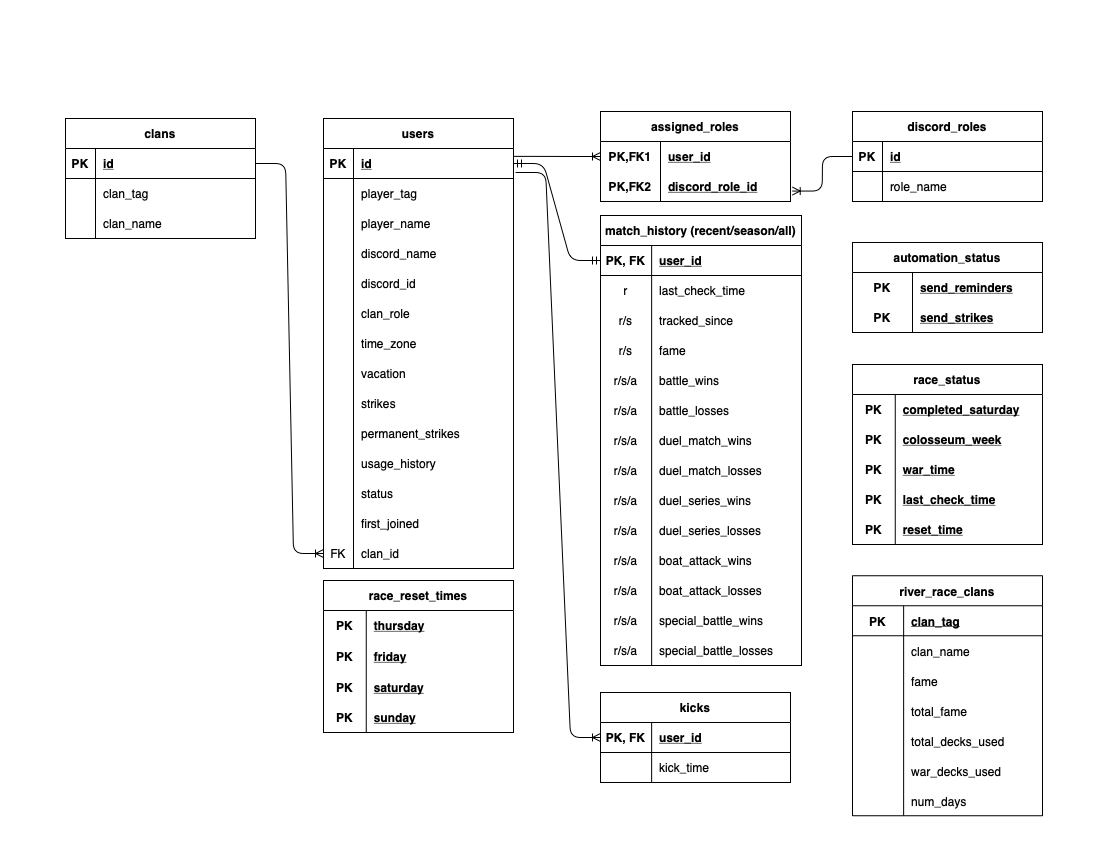
Database Schema